BassPreamp
A tube-voiced bass preamp and DI with a clean/preamp blend, Presence, built-in speaker voicing and a three-band EQ with shiftable Bass and Mid, modelled on a classic bass preamp/DI pedal. The clean path is full-range, and the preamp path's fixed voicing makes it usable straight into a desk.
Download
Download BassPreamp 0.1.0 Try it in your browser
Linux x86_64. CLAP, VST3 and LV2 with an installer. SHA256SUMS · Release notes · How to install
Details
| Property | Value |
|---|---|
| Source | src/basspreamp.dsp |
| Plugin URI | urn:pedalkit/basspreamp |
| LV2 class | Amplifier |
| Channels | Mono in, mono out |
| Latency | 64 samples (1.3 ms at 48 kHz), reported to the host |
| Research | Circuit notes |
| Try it | Browser demo (no install; see how it works) |
| Host guides | Loading in a host · Using the effects in REAPER |
Controls
| Control | Range | Default | What it does |
|---|---|---|---|
| Level | −40 to +12 dB | 0 dB | Output level. 0 dB is unity gain at Blend 0 with a flat EQ. |
| Blend | 0 to 100 % | 50 % | 0 = clean only, 100 = preamp only. Below about 34 Hz the clean signal always passes, as on the hardware. |
| Drive | 0 to 100 % | 50 % | Gain of the drive stage, 12.5 to 40 dB (log-uniform). Audible breakup starts around noon at −12 dBFS input. |
| Presence | 0 to 100 % | 50 % | Boost-only upper-mid/treble gain ahead of the drive stage, so it also adds bite to the distortion |
| Bass | −12 to +12 dB | 0 dB | Low shelf at 80 Hz (40 Hz with Bass Shift) |
| Mid | −12 to +12 dB | 0 dB | Peaking band at 500 Hz (1 kHz with Mid Shift) |
| Treble | −12 to +12 dB | 0 dB | High shelf at 2.8 kHz |
| Bass Shift | off/on | off | Moves Bass from 80 Hz to 40 Hz, for 5- and 6-string basses |
| Mid Shift | off/on | off | Moves Mid from 500 Hz to 1 kHz |
| Cab Bypass | off/on | off | Removes the fixed speaker voicing from the preamp path, for a real cabinet or an impulse response. Not on the hardware. |
Every control is smoothed, including the switches: the shifts glide the band frequency rather than jumping, and Cab Bypass crossfades. The plugin also has a read-only Latency output for the host's delay compensation.
Starting settings
Set your interface gain so that your loudest notes peak around −12 dBFS before the plugin (see Input level), then start here:
| Control | Start at | Notes |
|---|---|---|
| Level | 0 dB | Unity gain at Blend 0 with a flat EQ |
| Blend | 50 % | 0 is clean only, 100 is preamp only |
| Drive | 50 % | Light, odd-order breakup. Raise it for grit |
| Presence | 50 % | Adds bite ahead of the clipping, so it also affects the distortion |
| Bass, Mid, Treble | 0 dB | Flat |
| Bass Shift | off | Turn on for a 40 Hz shelf, for 5- and 6-string basses |
| Mid Shift | off | Turn on to move the mid band from 500 Hz to 1 kHz |
| Cab Bypass | off | Turn on when the preamp feeds a bass cabinet or an impulse response |
- For a clean low end with some grit on top, keep Blend around 30–50 % and raise Drive.
- If the top end goes hollow around 2.5 kHz at mid Blend and high Drive, the clean and driven paths are cancelling. This is a property of the modelled blend circuit. Move Blend or reduce Drive.
- The output never exceeds −0.1 dBFS, because of the built-in safety limiter. If it sounds squashed, lower Level.
Presets
The LV2, VST3 and CLAP plugins all ship with the same factory presets, which hosts list in their preset menu (REAPER's preset box, Ardour's and Carla's preset lists, or jalv's presets command). VST3 hosts see them as the plugin's program list, and CLAP hosts through preset discovery. They are starting points, chosen by measurement rather than by ear. Each one sets every control, and Level is set so that a −12 dBFS plucked bass line comes out within 0.25 dB of "Clean DI" (K-weighted), so switching presets doesn't jump in loudness.
| Preset | Level | Blend | Drive | Presence | Bass | Mid | Treble | Shifts | Idea |
|---|---|---|---|---|---|---|---|---|---|
| Clean DI | 0 | 0 | 0 | 50 | 0 | 0 | 0 | Clean path, flat EQ. The level reference. | |
| Warm Blend | +0.2 | 40 | 35 | 40 | +2 | 0 | −2 | Some preamp under the clean signal | |
| Growl | −2.5 | 70 | 65 | 60 | +2 | +4 | 0 | Mid | Audible breakup with a 1 kHz lift |
| Grind | −8.5 | 100 | 90 | 70 | +3 | +3 | +2 | Preamp only. Mid fills the voicing's fixed dip near 450 Hz. | |
| Scooped Slap | −1 | 25 | 20 | 70 | +5 | −6 | +6 | For slap and pop | |
| Low B Thump | +0.5 | 35 | 40 | 40 | +4 | −2 | −3 | Bass | 40 Hz shelf for five- and six-string basses |
| Dark Dub | −1.5 | 45 | 25 | 20 | +6 | +2 | −9 | Heavy lows, little treble |
Levels are in dB and Blend, Drive and Presence in %. The presets live in src/basspreamp.presets.toml. Edit that file and run make lv2 test FX=basspreamp: the build checks that every preset sets every control within its range, and test_presets.py re-measures loudness and peak level.
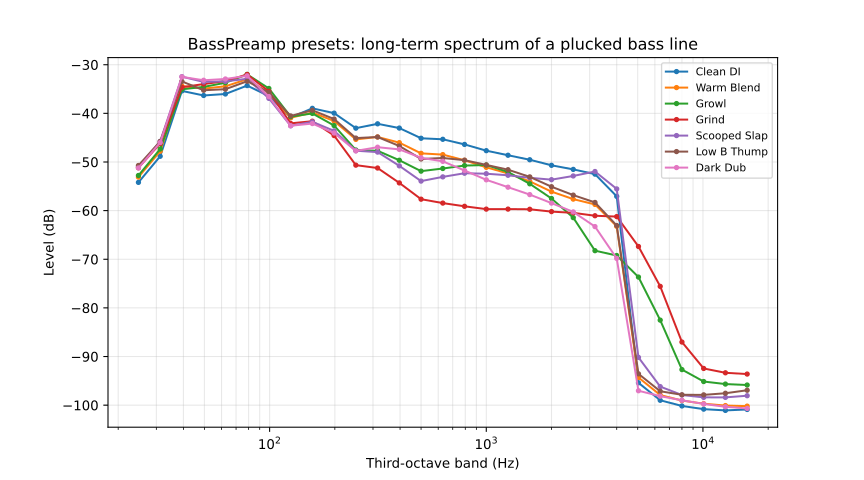
Data: presets_spectrum.csv (preset, band_hz, level_db) and presets_levels.csv (preset, loudness_rel_db, peak_dbfs, square_peak_dbfs).
Signal path
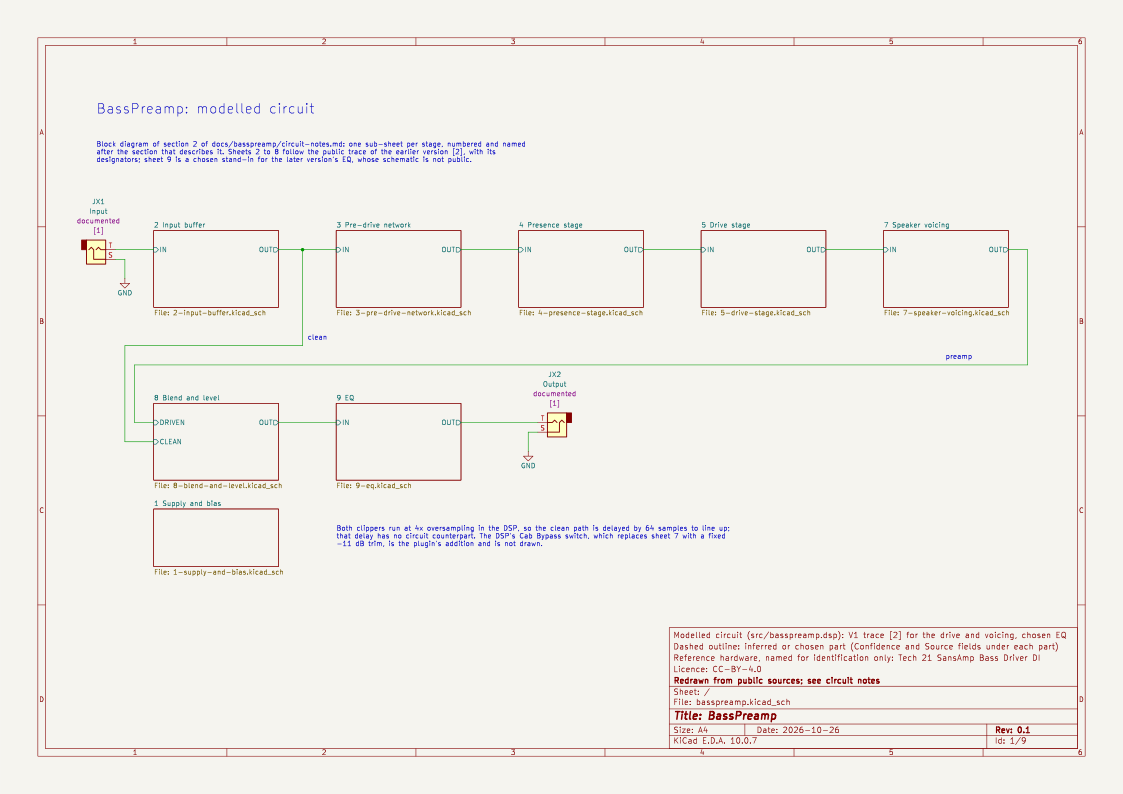
in → DC blocker (5 Hz)
   ├─ clean:   delay 64 samples
   └─ preamp:  bass-weighted input network
               → Presence stage → 4x oversampled rail clip
               → Drive stage    → 4x oversampled rail clip
               → speaker voicing (or −11 dB with Cab Bypass): divider + Sallen-Key low-pass with shelf leg
                 → Sallen-Key low-pass (2.97 kHz) → bridged-T notch (424 Hz)
               → trim
→ Blend (clean + Blend × high-pass(preamp − clean) at 34 Hz)
→ Bass (shelf, 80/40 Hz) → Mid (peak, 500 Hz/1 kHz) → Treble (shelf, 2.8 kHz)
→ Level → safety limiter (≤ −0.1 dBFS) → out
- The preamp path follows a public DIY trace of the earlier hardware version. Each op-amp stage is its traced filter followed by a memoryless clip at the op-amp's rails (about ±3.1 V).
- Presence is a non-inverting stage whose ground leg sets a boost of up to about 30 dB around 3–5 kHz. It sits before the drive stage, so it changes what gets clipped as well as the tone.
- The speaker voicing is the fixed filtering after the clipper: a low shelf of about −10 dB from 90 to 340 Hz, two low-passes and a notch of about −11 dB at 424 Hz. It is always on in the hardware. Cab Bypass replaces it with a fixed −11 dB trim (see Cab Bypass).
- Blend models the hardware's capacitor-coupled pot: the preamp signal reaches the pot through a 47 nF capacitor, so the clean low end below about 34 Hz always passes, and the clipper's DC offset is removed.
- The EQ follows the current version's published specification (±12 dB, switchable frequencies). The filter shapes are chosen.
The circuit notes give the derivation of every stage and the confidence level of each value. The fixed networks are generated from the traced component values by tools/basspreamp-networks.py.
The schematic draws the same path, one sheet per section of the circuit notes, with the trace's designators. Its EQ sheet is a chosen stand-in, because no schematic of the current version is public.
Measured behaviour
These figures come from make test at 48 kHz. The plots below are regenerated each time the site is published. Click a plot to open it full size; the CSV data behind each one is linked underneath.
Summary
- Silence in gives silence out. The output stays below −120 dBFS at all 96 combinations of extreme settings, including both switch positions.
- Peak level. With every control at maximum and 0 dBFS square waves, noise, sweeps or impulses in, the worst sample is −0.10 dBFS.
- Flat when bypassed. Blend 0 with a flat EQ is flat within ±0.16 dB from 30 Hz to 15 kHz.
- The low end holds up. At Blend 50 %, the low E fundamental (41 Hz) rises by 5.2 dB from Drive 0 to 100 %, and never drops.
- Presets. All seven are within 0.25 dB of "Clean DI" in K-weighted loudness on a −12 dBFS bass line. With a 0 dBFS 41 Hz square wave in, none peaks above −0.10 dBFS.
- Aliasing. Against a 1x build of the same DSP at full Drive and Presence, 4x oversampling lowers the worst alias by 59 dB for a 3.7 kHz tone and by 68 dB for a 1.1 kHz tone. The worst alias at 1.1 kHz is −113 dBc.
Frequency response
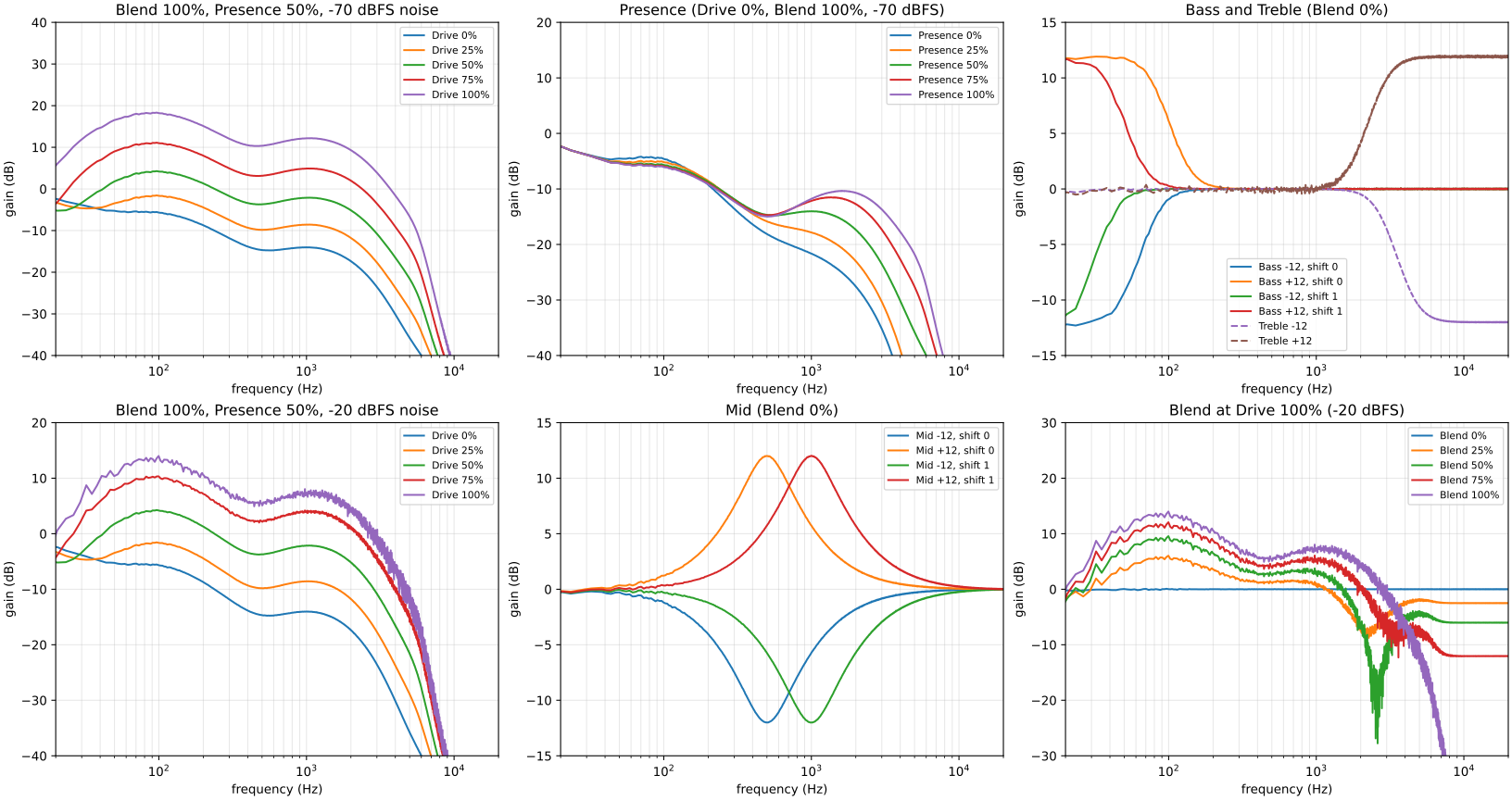
Data: freqresp.csv (columns panel, input_dbfs, blend, drive, presence, bass, mid, treble, bass_shift, mid_shift, freq_hz, gain_db).
- Preamp path (Blend 100 %, left column). For small signals, the response has a bass hump around 100 Hz, a dip around 450–500 Hz and a second hump near 1 kHz. It rolls off steeply above about 3 kHz and is 57 dB below its peak at 12 kHz. Drive raises the whole curve. At −20 dBFS the clippers compress it, so the top curves bunch together.
- Presence (top middle). Adds up to 21.5 dB in the 1–3 kHz range and never cuts. Below about 300 Hz every setting is the same.
- Bass and Treble (top right). Bass reaches +9.3 dB at 80 Hz and +11.8 dB at 27 Hz, or +8.8 dB at 40 Hz with Bass Shift. Treble reaches +9.1 dB at 2.8 kHz and +11.9 dB at 12 kHz.
- Mid (bottom middle). The peak sits within 1 % of 500 Hz and 1 kHz at exactly ±12.0 dB.
- Blend at full Drive (bottom right). At Blend 50 % the clean and preamp paths cancel near 2.5 kHz. This is a property of the hardware's blend circuit as traced, and is worth listening for (see What to tune by ear). Above about 5 kHz only the clean signal is left, scaled by the Blend setting.
Cab Bypass
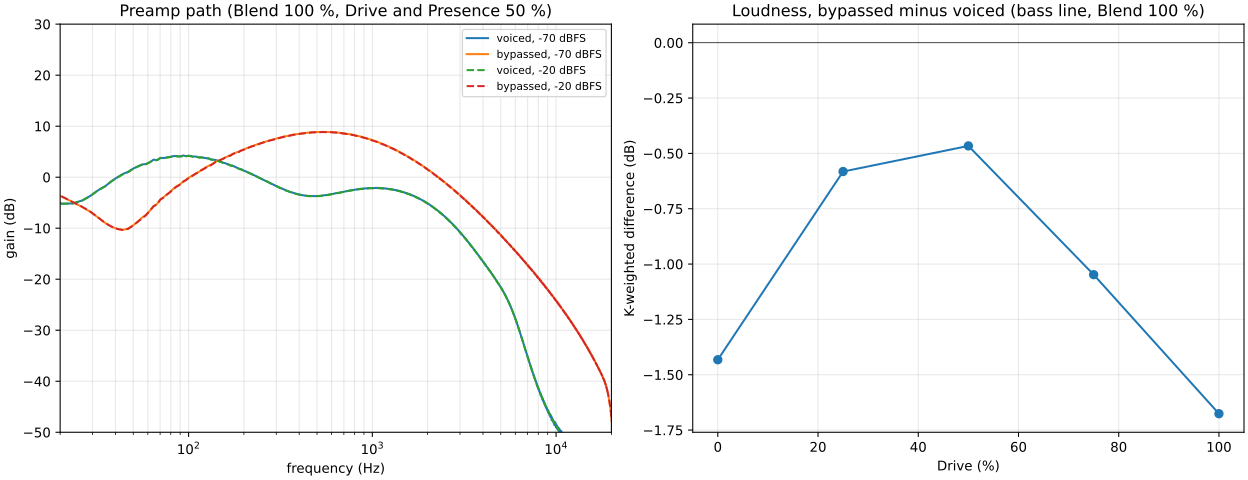
Data: cabsim.csv (input_dbfs, cab_bypass, freq_hz, gain_db) and cabsim_loudness.csv (drive, bypassed_minus_voiced_db).
Cab Bypass is not on the hardware. It removes the speaker voicing from the preamp path, for use with a real bass cabinet or a cabinet impulse response, and puts a fixed −11 dB trim (bypTrim, chosen) in its place. The clean path is unaffected.
- Response. Bypassed, the preamp path is a broad hump peaking near 500 Hz. At 12 kHz it is 37 dB below its peak instead of 57 dB. It is still far from full-range, because the input network and the drive stage's feedback capacitor also roll off the top.
- Low end. The voicing's bass hump around 100 Hz goes, and the bypassed path partly cancels the clean lows that pass through the Blend capacitor, giving a dip of about −10 dB near 45 Hz at Blend 100 %.
- Loudness. On a −12 dBFS plucked bass line at Blend 100 %, bypassed is within 0.5 dB of voiced at Drive 50 % and within 1.7 dB from Drive 0 to 100 % (K-weighted).
Harmonics and aliasing
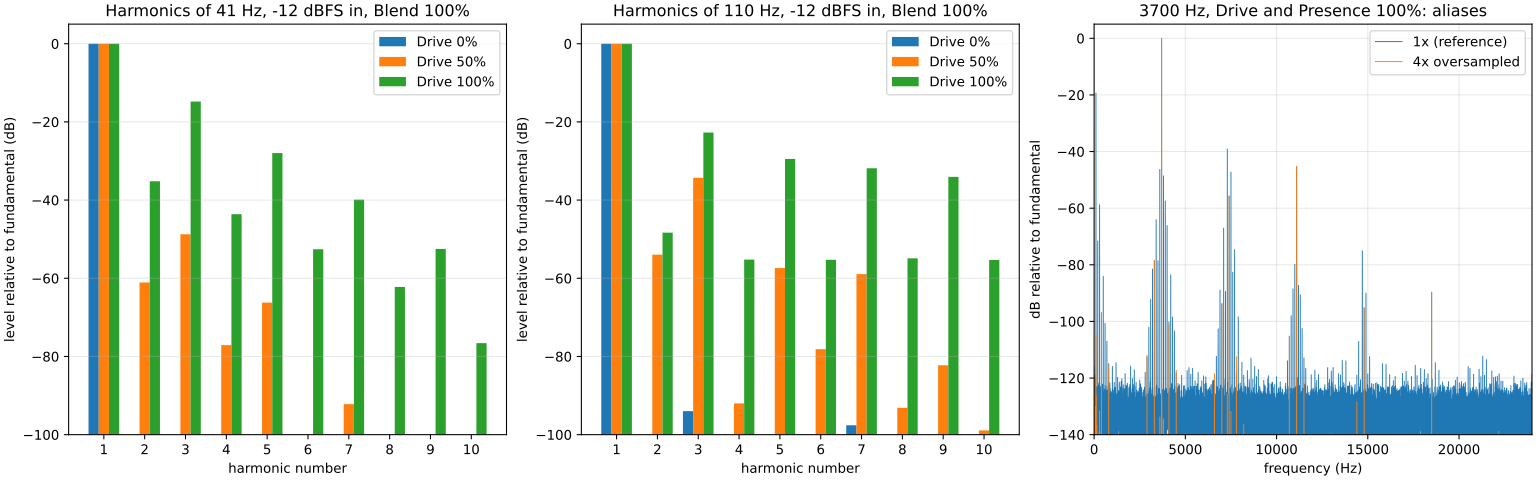
Data: harmonics.csv (f0_hz, drive, harmonic, level_dbc) and aliasing.csv (build, f0_hz, worst_alias_dbc).
Single sines at −12 dBFS, preamp path only (Blend 100 %, Presence 50 %):
| Drive | 41 Hz THD | 110 Hz THD | Character |
|---|---|---|---|
| 0 % | < 0.01 % | < 0.01 % | Clean |
| 50 % | 0.4 % | 1.9 % | Light, odd-order |
| 100 % | 18.8 % | 8.7 % | Heavy, odd-order. H2 grows with Drive (−35 dBc at 41 Hz). |
The right-hand panel compares a 1x build with the 4x-oversampled plugin for a 3.7 kHz tone at full Drive and Presence. The aliases are the components that fall between the harmonics.
Sweeps and low-end retention
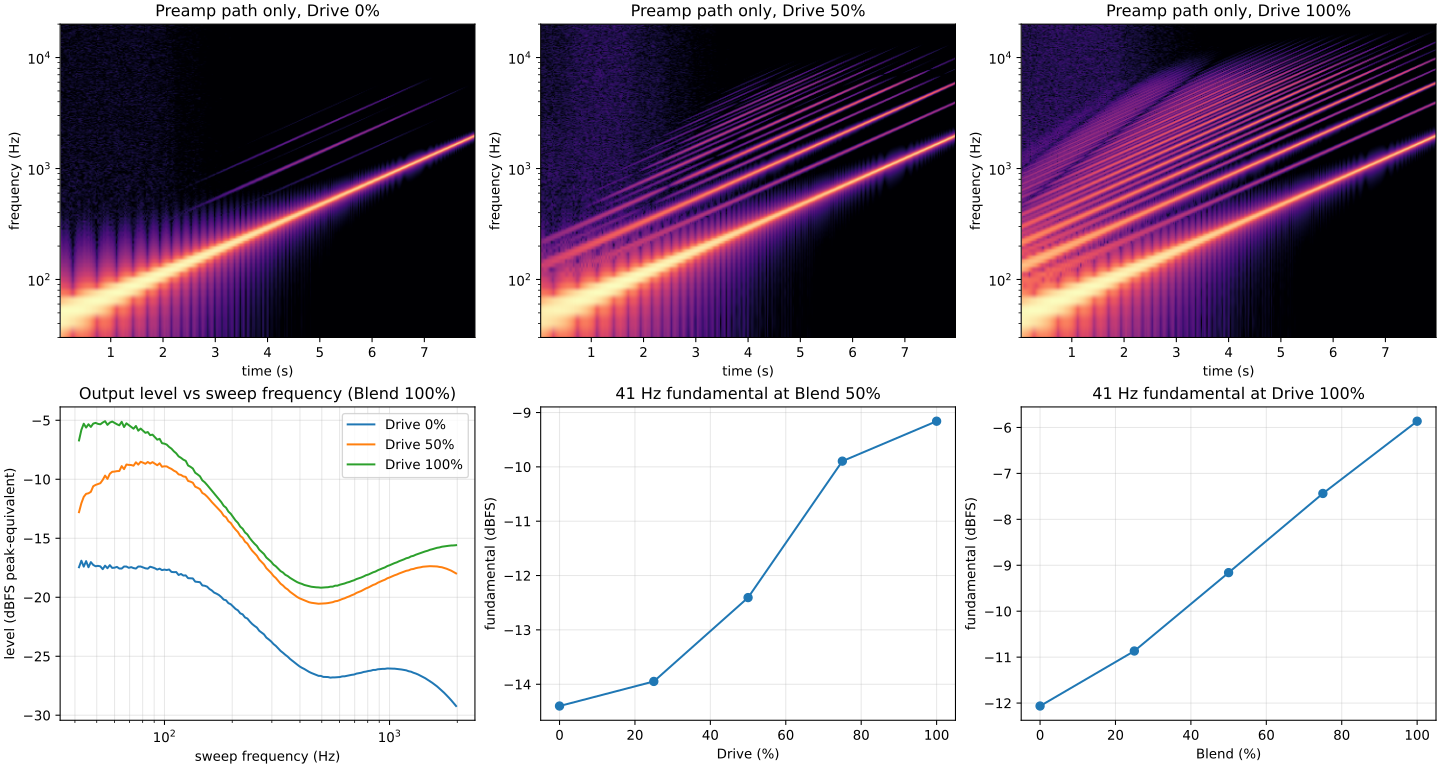
Data: sweep_level.csv (drive, freq_hz, level_db) and lowE_fundamental.csv (sweep, setting, fundamental_dbfs).
The spectrograms show the harmonics spreading as Drive rises. The bottom row shows the level of the 41 Hz fundamental: at Blend 50 % it rises with Drive and never drops, because the clean path is full-range and the preamp path adds to it.
Listening scenarios
make test FX=basspreamp also renders ten realistic settings (clean, warm, grit, heavy, a hot input, low B, slap, extreme EQ and the Blend cancellation case) to tests/out/basspreamp/scenarios/. Each has the dry input, the output, an RMS-matched output and an _ab.wav that alternates dry and matched, so loudness does not bias the comparison. Measurements (peak, crest factor, spectral centroid, band spectra) are in scenarios_metrics.csv and scenarios_spectra.csv.
The default source is a synthesised plucked bass. To audition a real clean DI recording instead, save it as tests/data/bass-di.flac (or .wav), or set BASS_DI=/path/to/file. It needs ffmpeg, and the output then goes to scenarios-<file name>/. Only commit a recording whose licence allows it, and record the source in docs/.
What to tune by ear
These are measured approximations that have not been listening-tested. Each item names the control or src/basspreamp.dsp constant to change.
- Input level first. The model treats 0 dBFS as 1 V at the input. If Drive 50 % sounds too clean or too dirty, check your interface gain before changing constants.
- Clipping character.
railN(5) sets how hard the op-amp rail clipping is. Lower values are softer and more "tube-like".vos(2 mV) sets the asymmetry, and so how much H2 appears as Drive rises. - Drive and Presence taper. The
pow(...)laws inRgPresanddriveGset how the controls spread. The real pots are linear, and the hardware bunches the action near the end. - Clean/preamp loudness.
drvTrim(0.32). Set it so that sweeping Blend at your usual Drive doesn't change the perceived volume. - The blend notch. At Blend around 50 % and high Drive, the paths cancel near 2.5 kHz. Listen for a hollow top end.
- EQ shapes.
midQ(0.7) andtrebF(2.8 kHz) are choices, and so is the use of shelves for Bass and Treble. - Presets. Every setting in
src/basspreamp.presets.tomlis chosen. Check that each preset sounds like its name, and that the loudness match holds with a real bass and your interface gain. - Cab Bypass level.
bypTrim(0.28, −11 dB) is matched by K-weighted loudness. Toggle Cab Bypass at your usual settings and adjust it so the level doesn't jump. Also listen for thin lows near 45 Hz at high Blend with the bypass on.
Known limitations
- It is based on the earlier version's schematic. No schematic of the current version is public. The drive section and speaker voicing follow a DIY trace of the earlier version, and the EQ follows the current version's published specification. See the open questions in the circuit notes.
- It isn't a full circuit simulation. Each op-amp stage is a linear filter followed by a memoryless rail clip, so effects such as the feedback capacitors acting while clipped, slew limiting and recovery from overload are not captured.
- The mixer stage's clipping is left out. On the hardware, the ×2.2 mixer can clip at high Blend and Drive.
- The output switches are not modelled: the −20 dB pad, the +10 dB boost, phantom power and the ground lift.
- Mono only.
- Low sample rates shift the top end. Analogue sections whose prewarp frequency would be above 90 % of Nyquist are prewarped at 90 % of Nyquist instead (see
tf2a/tf1a), so below about 13 kHz the treble response differs from the 48 kHz plots.test_samplerates.pychecks that the output stays finite and within 6 dB at 110 Hz from 8 kHz to 192 kHz.
BassPreamp is an independent model built from public information. It is not affiliated with, or endorsed by, any pedal manufacturer.